
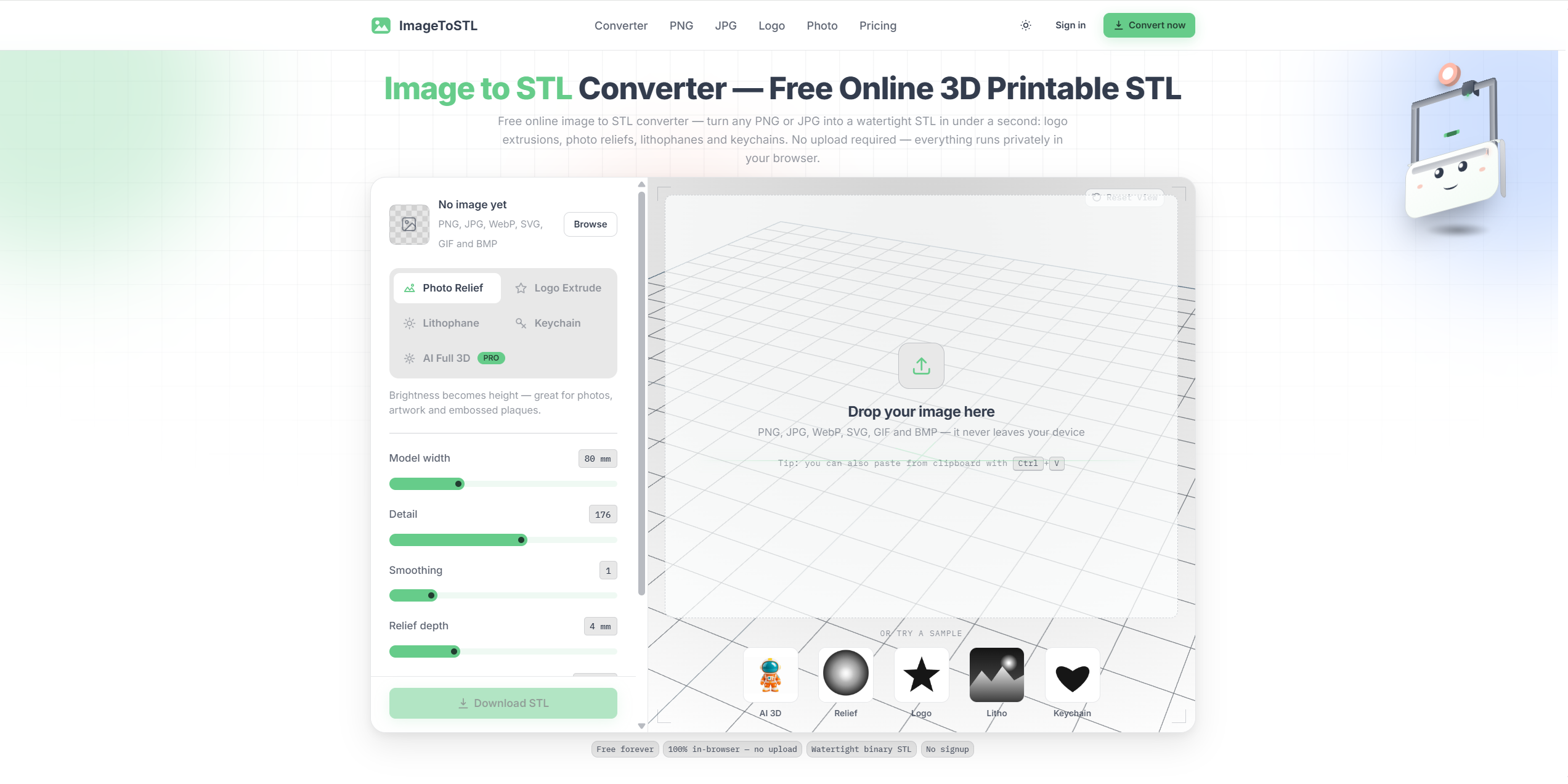
What website is this?
ImageToSTL.online (imagetostl.online) is an online image-to-STL converter built for 3D printing users. Its core job is turning flat images into sliceable STL files through modes such as reliefs, silhouette extrusions, lithophanes, and keychains. The product emphasizes browser-based use and local processing, so it is better suited to quickly turning logos, photos, or simple graphics into printable models than to reconstructing complex full 3D objects from a single photo.
Key Features
- Convert PNG, JPG, WebP, SVG, GIF, and BMP images into downloadable STL files.
- Use dedicated modes such as Photo Relief, Logo Extrude, Lithophane, and Keychain.
- Preview the result in live 3D and adjust parameters with sliders before export.
- Export closed, printable binary STL files for Cura, PrusaSlicer, Bambu Studio, Orca, and similar slicers.
- Optionally use paid AI Full 3D to generate a complete 360-degree 3D mesh from one photo.
Use Cases
- Hobbyist makers who have a logo or icon can quickly create tags, badges, or signs through silhouette extrusion.
- People making gifts can upload a family photo and generate a backlit lithophane print.
- Small shops or studios that need to test how a design looks in 3D can preview it in the browser and then export the STL to a slicer.
- Users with flat illustrations or black-and-white graphics can make relief-style decorative plates, labels, or simple embossed pieces.
Who is it for?
- Hobbyists, makers, and desktop 3D printing users who want to turn flat images into STL files quickly.
- People making logos, nameplates, lithophanes, keychains, or other shallow-relief printable objects.
- Users who prefer local browser processing and do not want to create an account or upload files for the free modes.
- Not ideal for people expecting automatic high-detail characters, mechanical parts, or full scan-like 3D reconstruction.
How It Compares to Similar Tools?
Tools in this category usually follow two routes: one treats flat art as a heightmap or silhouette for printable conversion, while the other promises full 3D generation from a single image. ImageToSTL.online is clearly stronger in the first route. That makes it more honest and practical for logos, reliefs, and lithophanes that naturally fit 2.5D conversion. If you need a full-angle mesh for a more complex object, the site does offer paid AI Full 3D, but the free core product is not a general-purpose 3D reconstruction tool.
Pricing Details
- Free: $0 for Photo Relief, Logo Extrude, Lithophane, and Keychain, with no account, unlimited conversions, and no watermark.
- The free tier includes live 3D preview and watertight STL export for standard printable conversions.
- Starter: $9.99 one-time for 3 AI Full 3D generations, about $3.33 each.
- Plus: $19.99 one-time for 25 AI Full 3D generations, about $0.80 each.
- Pro: $29.99 one-time for 100 AI Full 3D generations, about $0.30 each; pricing and entitlements should be confirmed on the latest official page.
FAQs
- Q: Is ImageToSTL.online completely free?
- A: The standard image-to-STL modes are free, including relief, logo extrusion, lithophane, and keychain. Only AI Full 3D is billed separately.
- Q: Does the site upload or store my images?
- A: The site says free-mode images do not leave your device and are processed locally in the browser with Canvas and WebGL. AI Full 3D is the exception because it sends the image to a generation provider.
- Q: Can I print the exported STL directly?
- A: The product states that it exports closed, manifold STL files with a solid base, with the goal of slicing cleanly in mainstream slicer software.
- Q: Is this an AI tool that turns any photo into a full 3D model?
- A: Not in the free core flow. The default modes are deterministic heightmap or silhouette conversions. Full 360-degree mesh generation is part of the paid AI Full 3D option.
Why We Recommend
ImageToSTL.online is useful because it stays focused on one practical job: turning images into printable STL files without unnecessary setup. For 3D printing users making logos, reliefs, keychains, or lithophanes, that is often more valuable than a broader AI 3D promise because the output target is clearly printable. The tradeoff is also clear: if you need complex object reconstruction instead of fast image-to-print conversion, the paid AI mode is the relevant path, not the free converter.


