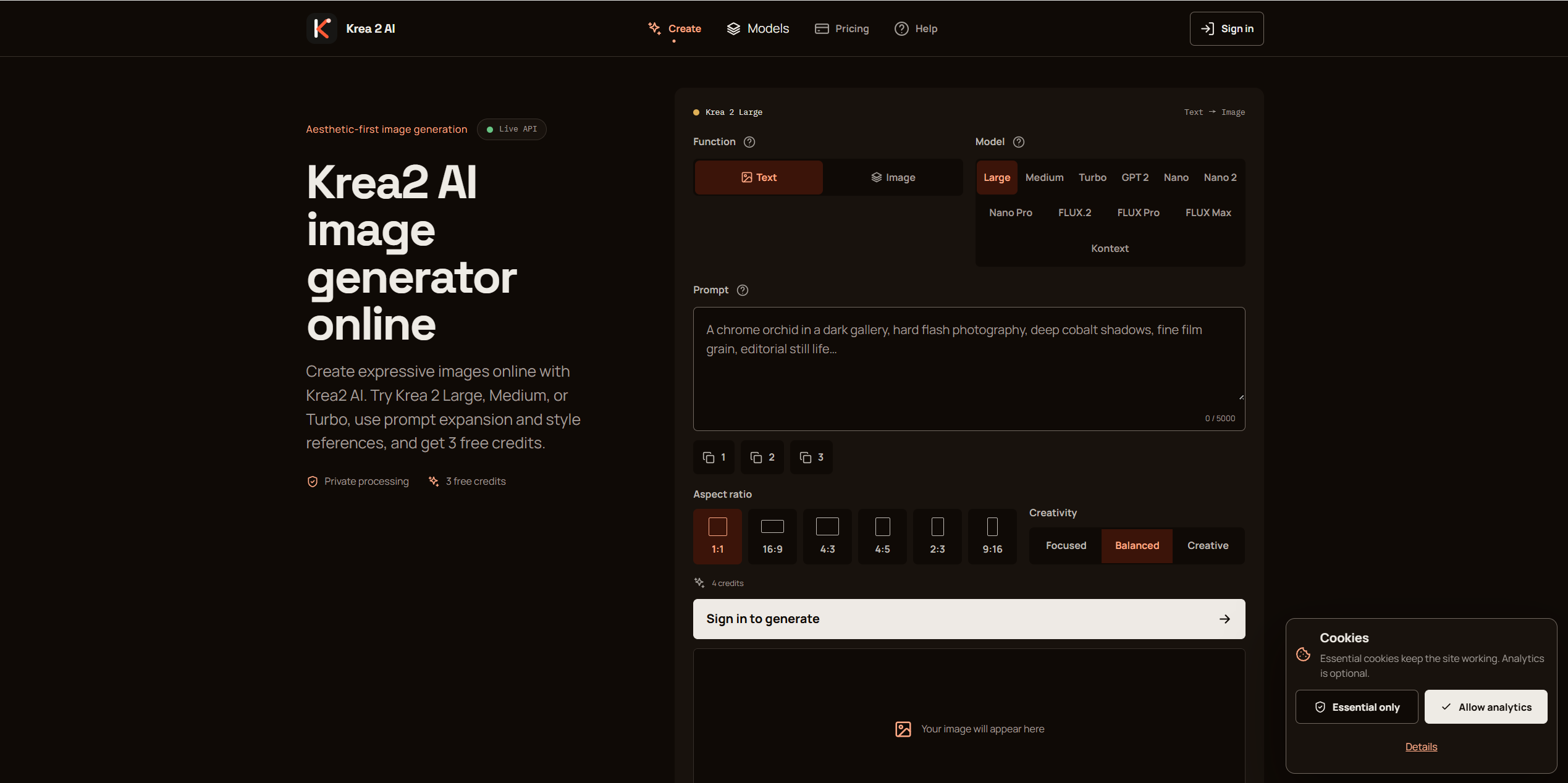
What website is this?
krea2.org is an online AI image workbench centered on Krea 2’s Large, Medium, and Turbo variants, with guest routes such as GPT Image, Nano, and FLUX available in the same interface. The use case is concrete: explore lighting and texture without hopping between sites. Compared with one-click generators, it builds controlled iteration into the flow—credit cost is shown before each run, with prompt expansion and reference-based edits—so it fits creators who need to refine a look across multiple passes.
Key Features
- Switch among Krea 2 Large, Medium, and Turbo in one workbench
- Open guest model routes such as GPT Image, Nano, and FLUX when needed
- Generate new compositions with text-to-image, or restyle via image-to-image on guest routes
- Expand short ideas into fuller prompts covering composition and materials
- Pick aspect ratio and creativity level, with credits estimated before generation
- Create API keys to submit jobs against the same account credit balance
Use Cases
- Independent designers iterating moodboards with Medium or Turbo lighting and color passes
- Ad teams producing a more textured Large hero still for review before a pitch
- Social media operators testing vertical crops and color stories before committing to a shoot
- Creative leads comparing the same prompt on Krea versus a guest route before locking delivery
- Developers wiring generation into their own product via API on one shared credit pool
Who is it for?
- Illustrators and concept artists who repeatedly test light, texture, and unconventional framing
- Creative teams that want to compare Krea and GPT/FLUX routes in one UI
- Independent creators with limited budgets who prefer small, controlled credit spends
- Developers who need an API to embed image generation into a product flow
- Users who want a perfect one-shot result and dislike parameter iteration (weaker fit)
- Users whose main needs are video, 3D, or heavy team collaboration workspaces (this site is still-image focused)
How It Compares to Similar Tools?
The broader official Krea ecosystem usually covers a fuller creative suite; krea2.org behaves more like a lightweight workbench focused on Krea 2 variants plus guest routes. Community chat-style generators lean toward group collaboration; this is a web workbench where credits are visible before you run. If you need video, 3D, LoRA, and similar breadth, prefer a fuller suite; if you mainly want to switch Large/Medium/Turbo in one prompt box and occasionally open a guest route, a focused workbench is more direct.
Pricing Details
Public pricing on the site is roughly as follows (confirm on the latest page):
- Free: $0 with 3 welcome credits and basics such as generation history
- Creator: $19/month for 120 credits each month, rollover, cancel anytime
- Studio: $49/month for 330 credits each month, rollover, email support
- Credit pack: $12 once for 50 credits that never expire and work with any plan
Credit cost varies by model and is shown beside the generate button; failed jobs typically refund automatically. Checkout runs through Stripe and may include tax or regional differences. Final numbers follow https://krea2.org/pricing.
FAQs
Q: Is the Krea 2 online tool free?
A: You can start free with 3 welcome credits; ongoing use needs a subscription or a one-time credit pack.
Q: How should I choose Large, Medium, or Turbo?
A: Turbo favors fast trials, Medium is a balanced default, Large prioritizes detail and fidelity; open guest models for type, speed, or photoreal needs.
Q: Can I use generated images commercially right away?
A: The site says you must check applicable law, third-party rights, and publishing terms—do not assume unlimited commercial use.
Q: How is this different from the full official Krea suite?
A: This site focuses on Krea 2 variants and same-bench guest routes; for video, 3D, and broader capabilities you usually still need a fuller creative suite.
Why We Recommend
For navigation-site readers, krea2.org’s value is not a slogan about being “smarter,” but putting Krea 2’s three variants and guest routes in one workbench. Moodboard lighting tests, pitch stills, and prompt comparisons fit this short loop well; the trade-off is credit billing and doing your own parameter checks. If delivery depends on video, 3D, or heavy team collaboration, treat it as a supplement rather than the only production environment.