What is this website?
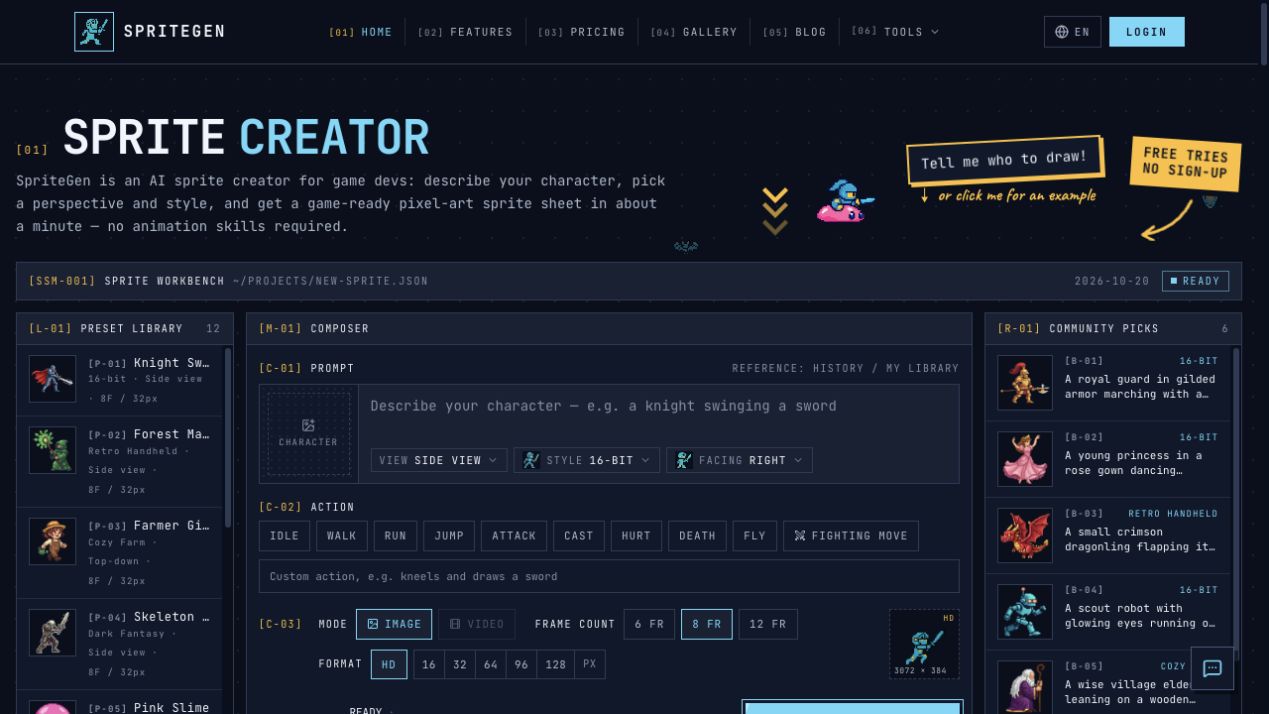
SpriteGen is an online pixel-art sprite tool for game development. You describe what a character is doing, choose a camera view and art style, and the site returns a transparent PNG sprite sheet with evenly spaced frames—plus a looping animation preview before you download. The same site also includes a single-frame AI sprite maker and a free browser pixel-art editor (no sign-in), so character animations, item icons, and hand-drawn grid art can stay in one workflow.
Key features
- Generate 6/8/12-frame pixel animation sprite sheets from text, with view and style options
- Preview a looping animation, then export transparent PNG, per-frame ZIP, or GIF
- Top-down/isometric can cover eight directions; side view covers left/right; reference images or “Next action” help keep character looks consistent
- Single-frame sprite maker: describe items, icons, or portraits as 16–128px transparent PNGs
- Free pixel-art editor: grid drawing, onion skin, PNG/sprite-sheet/GIF export, no credits used
- Engine-friendly exports for Unity, Godot, GameMaker, and Phaser, including Aseprite / TexturePacker JSON
Common use cases
- Indie developers who need walk, slash, and similar character animations without hand-drawing every frame generate a sheet from a description and drop it into an engine
- Level or UI designers who need static pixel assets such as potions, weapons, or skill icons batch them at a shared size with the single-frame maker
- Creators who want to edit pixels themselves or build Minecraft-style grid art use the free editor cell by cell, then export a GIF or sprite sheet
- When a character look is already set and only the next action set is missing, upload a reference or use “Next action” to keep face and outfit closer across sheets
Who is it for?
- Indie developers and prototypers who need engine-ready pixel character animations quickly
- Level/UI designers filling in static pixel props, portraits, and HUD icons
- Creators who prefer drawing pixels themselves and mainly need a grid plus onion skin
- A poorer fit for teams that require fully hand-controlled frame quality, or non-pixel / film-style animation pipelines
How does it compare to similar tools?
You do not need to name specific competitors—judge fit by workflow:
- Versus pure hand-pixeling: faster multi-frame animation and transparent PNGs, but line detail and cross-action consistency still depend on generation results and references
- Versus generic AI image tools: more oriented toward multi-frame sprite sheets, looping preview, and engine-ready slicing than single concept art
- Versus desktop pixel software: you can draw and export in the browser, but layer management and palette/project tooling are usually weaker than mature desktop apps
FAQ
Q: Is SpriteGen free? Do I have to sign up?
A: AI generation includes free tries (with a security check). After that it uses credits—about 4 credits per sprite sheet and about 2 per single-frame sprite. Signing up grants starter credits and a daily check-in bonus. The pixel-art editor is free and does not spend credits.
Q: Can it make 8-directional sprites or custom actions?
A: Yes. Top-down and isometric support eight directions; side view supports left and right. You can pick common actions or type custom ones (for example a crouching heavy kick).
Q: Can exports go straight into Unity or Godot?
A: Output is a transparent PNG with evenly spaced cells for engine slicing. You can also download a GIF, a ZIP of separate frames, or an atlas with Aseprite / TexturePacker JSON.