
What website is this?
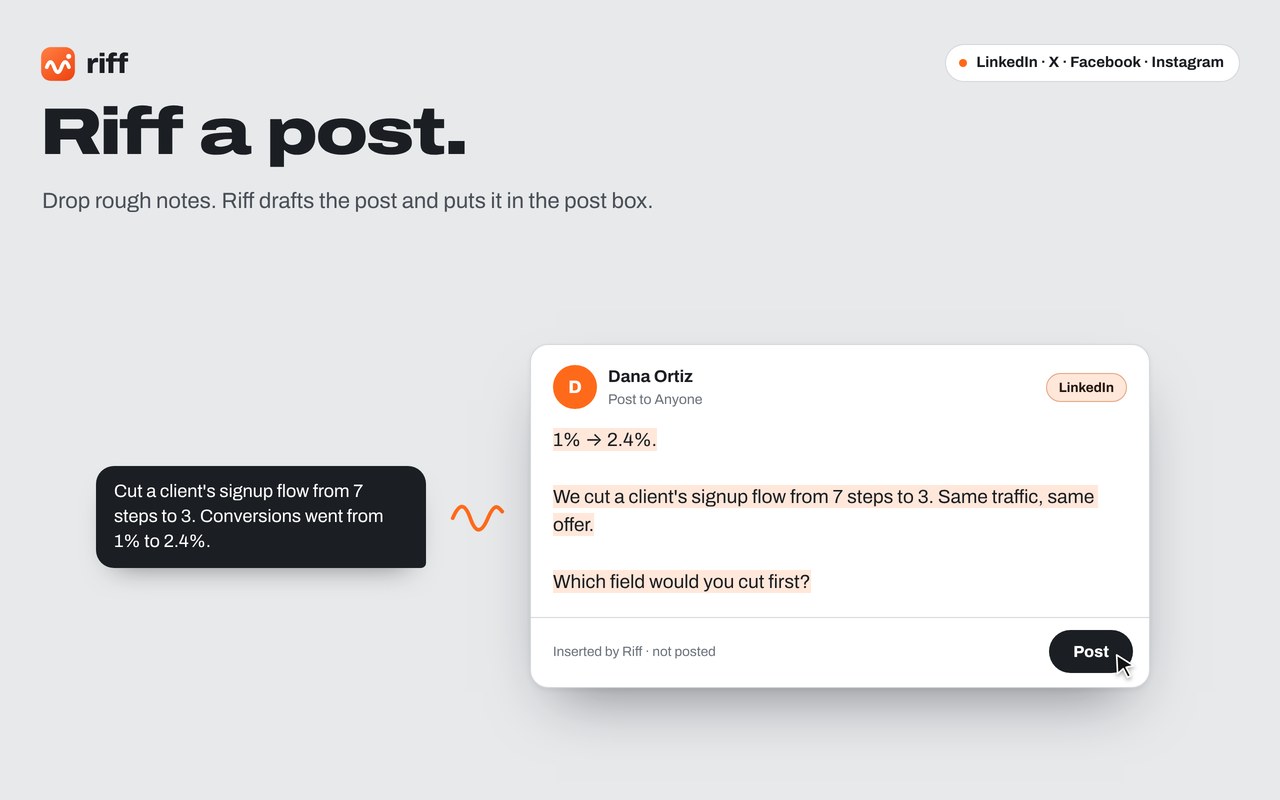
Riff is a writing extension that sits in the desktop Chrome side panel and follows the post, direct message, or composer you currently have open. You drop in a rough point or a few notes. It calls Gemini Nano, the model built into Chrome, rewrites a draft for that specific item, and fills the input box. Sending, commenting, and publishing still require your own click. Generation stays on the machine. The extension has no account and no monthly fee. The help manual says post writing covers X, LinkedIn, Facebook, and Instagram, while messaging also includes X Chat plus the web versions of Slack and Microsoft Teams in Chrome.
Key Features
- Click the wave button beside a post or click into the comment box, and it drafts a reply from that post and its context.
- Click into a chat box and it reads only that conversation; the point field can stay empty.
- Click into a new post box and it switches to post writing, keeping versions as you add notes, hooks, and plain-language edits.
- Set pitch strength, tone, length, language, and brand voice for the draft in front of you.
- Refit the same draft to another site's length, such as turning a LinkedIn post into an X thread.
- Check the draft against your last 60 replies or posts for repetition, and show a Fresh score.
Use Cases
- A consultant sees a landing-page complaint, turns a specific audit judgment into a comment, and clicks Reply.
- A salesperson gets a DM asking for a price and a meeting time, answers the question, asks what they need, and does not accept the price or time.
- When preparing a post, an operator with only a few lines about a client result shapes the body in the LinkedIn composer, then refits it as an X thread or an Instagram caption.
- A teammate in a web Slack channel or Teams chat drafts a reply from the latest message on screen and presses Enter.
- Someone posting as both a personal account and a company page selects a saved brand voice before writing that post.
Who is it for?
- People who often reply on X, LinkedIn, Facebook, and Instagram and want drafts tied to the original post rather than a template.
- People who handle DMs, X Chat, or web Slack and Teams, and still want to press Send themselves.
- People on desktop Chrome 138 or newer who will download Gemini Nano once onto the machine.
- People mainly on a phone, on an older Chrome, or on a machine that misses the install page's disk, GPU, or memory requirements will not get the model running.
- People who want scheduled auto-publishing, or who only use the Slack and Teams desktop apps, are outside how it works.
How It Compares to Similar Tools?
The site does not name competitors or rankings. What can be checked is its own tradeoffs. Whether text leaves the computer: drafts are generated on-device by Chrome's built-in model, and the extension does not send posts to a server that needs an API key. Which box the writing follows: comments, DMs, and posts each use the page in front of you, rather than a generic draft with no context. Who sends: it stops after filling the box, with no scheduling and no posting on your behalf. If you need an account manager that publishes automatically, that boundary does not fit. Hardware is separate. The install section asks for Chrome 138 or newer, about 22 GB free on the drive that holds the Chrome profile, and a GPU with more than 4 GB of video memory, or 16 GB of RAM and at least 4 CPU cores.
FAQs
Q: Is Riff free, and does it need an account or an API key?
A: The privacy policy says it is free to use, with no account, subscription, or payment. The extension does not need an API key. The first time you open the panel, Chrome downloads Gemini Nano once.
Q: Will Riff post or reply to DMs for me?
A: No. It fills the comment, message, or post box and stops. It does not schedule or press Send. On Facebook and Instagram, Enter sends, so it only pastes.
Q: Which sites can it write posts and messages for?
A: Posts cover LinkedIn, X, and Facebook, plus Instagram captions marked beta in the help manual. Messages cover DMs on those sites, X Chat, and the Chrome web versions of Slack and Teams. Desktop apps and messenger.com are out of scope.
Q: Can I use it if my computer cannot run Gemini Nano?
A: The install section requires desktop Chrome 138 or newer on Windows 10 or 11, macOS 13 or later, Linux, or a Chromebook Plus, plus the stated disk and GPU or memory conditions. If the panel says AI unavailable, chrome://on-device-internals shows what Chrome reports.





