

What Is This Website?
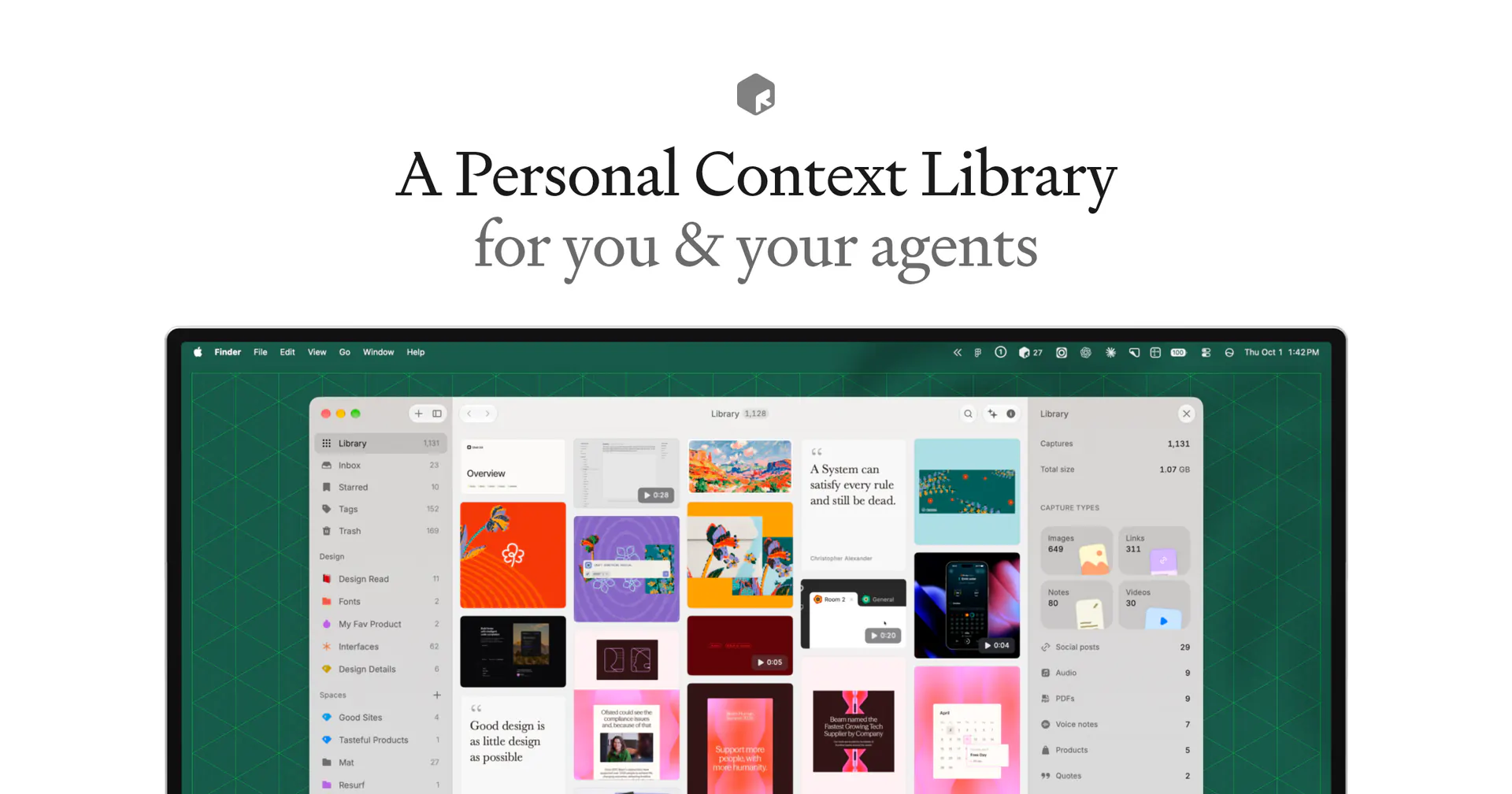
Resurf is a personal library that stays on the user's own devices and holds notes, bookmarks, screenshots, PDFs, and other files. The Mac app handles quick capture, an inbox, spaces for a project, and both full-text and meaning search. iPhone and iPad can save and browse for free. When needed, Claude, Cursor, or Codex can read saved items through an interface. Files stay on the device by default. Optional sync uses the user's own iCloud, and a Resurf account is not required. After the seven-day trial, existing items can still be browsed, searched, and exported.
Key Features
- A Mac shortcut saves notes, links, and screenshots into an inbox that can be sorted later.
- Spaces and tags group items by project, and a visual library shows bookmarks beside screenshots.
- Local search covers notes, articles, PDF text, and words in screenshots, including search by meaning.
- The site also describes a reader, PDF notes, highlights, and voice memos.
- Optional summaries use the user's own model key, including local Ollama.
- A Chrome extension, the iPhone share sheet, MCP, and a CLI capture items or hand the library to coding agents.
Common Use Cases
- A person collecting design references screenshots and saves links on Mac, then sorts them into spaces later instead of picking a folder first.
- A reader saves an article into the reader, highlights beside the source, and finds it again with on-device search.
- A programmer asks Claude, Cursor, or Codex to look up saved notes and links over MCP.
- Away from the desk, the iPhone share sheet stores a link, and the same library continues on the Mac.
Who Is It For?
- People who work mainly on a Mac and want bookmarks, notes, and screenshots kept on the device.
- People already using Claude, Cursor, or Codex who want those agents to read a private library.
- People who only use iPhone or iPad and do not need to keep adding captures on a Mac. The site says the mobile apps are free.
- Teams that need a Windows client, an Android app, or an account hosted by Resurf will not find those products on the current pages.
Comparison with Similar Tools
- If a cloud account and a web admin are the point, Resurf's description keeps the library on devices, with optional sync through the user's own iCloud and no Resurf account.
- If the library should be readable by coding agents, the site presents MCP and a CLI for Claude, Cursor, and Codex, not only a personal bookmark list.
- If the choice is a one-time payment versus a monthly rental, the Mac license is a one-time purchase, not an auto-renewing subscription. After the trial, browsing and export remain; adding captures requires a license.
Pricing Details
The license page lists two one-time US dollar purchases, not subscriptions. Standard is 39 dollars, shown with a regular price of 49, and includes two years of updates. Another two years is an optional 29 dollars. Lifetime is 79 dollars, shown with a regular price of 99, and includes later updates. Both cover up to two Macs and the same app. The Mac trial is 7 days with no card. Afterward nothing is deleted: browse, search, export, and sync continue, while new captures and spaces need a license. iPhone and iPad stay free and unlimited. Refunds run 14 days, and checkout uses Polar. Optional AI is billed by the user's provider. Saving and search do not need AI. The homepage asks for macOS 14.3 or later on Apple silicon and Intel.
FAQ
Q: Do saved items disappear when the 7-day trial ends?
A: The license page says they are not deleted. Browsing, search, and export remain. New captures and spaces need a Mac license.
Q: Does iPhone require a separate purchase?
A: No. The page says iPhone and iPad are free and unlimited. Payment is for the one-time Mac license.
Q: Is a Resurf account and AI required?
A: The site says a Resurf account is not required. Summaries and auto-organization are optional and use the user's own key. Search and saving do not depend on them.
Q: How can a coding agent read the library?
A: The homepage says Claude, Cursor, or Codex can search and read the library over MCP, and a CLI is also listed.
Why We Recommend?
It keeps notes, bookmarks, screenshots, and PDFs in a local library and leaves an interface for coding agents, which suits people already collecting material on a Mac. Against a monthly cloud bookmark service, the Mac license is a one-time purchase and the phone apps stay free. After the trial, older items can still be viewed and exported, but adding captures on Mac requires a license. Windows and Android clients are outside the current product.


